Oh yeah! I forgot to post it here, but this horrible monster of a project is finally finished!
I don't know if you remember, but a few months ago I submitted this storyboard to my animation class. We all voted, and the top five were chosen to be made into animation. I was assigned/placed in a team of six (soon to be five) and we had roughly three months to create this animation.
We did all of the physical animation in Maya, and I either created from scratch, or had a hand in finishing/texturing, all of the models for the exception of the wolf, Skoll, who was created by Paul Miller, and textured by Katie Nestor.
Paul and I both wrote code for the world tree, but Paul ended up creating the final geometry, since OpenFrameworks is much more powerful and able to create more complicated geometry than my Processing script. I sculpted in the root details and rearranged/cleaned up the branches using ZBrush.
We broke up the actual animating by scene. I personally animated the fight scene, (since really that was the one least fleshed out in my storyboard, and I was excited to work on it) which starts around 1:28 and finishes at 1:44.

Showing posts with label digital work. Show all posts
Showing posts with label digital work. Show all posts
5.24.2012

5.18.2012
Waterbomb | A kinetic dress
Mechanical System
Once we had the waterbomb fabric, we looked at different mechanical systems that we could use to actuate it. We finally decided on monofilament truss system that we threaded through eyelets that we laser cut and hand sewed onto the vertices of the waterbomb valleys. We used these to control the movement we wanted from the dress via 3 cords made up smaller connections from the wiring in the dress. One string controlled the front vertical movement of the dress, the other the back vertical movement and the last one controlled constricting horizontal movement.


Electrical System
Mahvish and I are both software kind of girls with experience in small scale robotics, so we were super excited to jump in and …learn some basic electrical engineering. We designed the system to be relatively straightforward with that in mind. We anchored most of the heavier elements to the incredibly sturdy zipper of the dress so we wouldn’t need crazy boning/corsetry to hold it up.


(parts from top left clockwise: diy continuous rotation servo with bobbin, battery packs x2, diy voltage regulator, breadboard prototype for the breath sensor, slightly more buff diy continuous rotation servo hot glued to laser cut mount)
One of the most exciting elements of this project for us (and ultimately, the key to our doom), was the fact that we built the key elements of the electrical system ourselves. We hacked some basic hobby servos Mahvish had for continuous rotation by removing the pentometer and replacing it with two 2.2kohm resistors. We also built a voltage regulator so we could power our initial design, which required 5 normal servos, off of a single 9volt that we ended up scrapping, but were immensely proud of. Lastly the breath sensor built into the collar took advantage of the thermochromatic paint. When the wearer breathes on it, the paint changes color which is picked up by a light sensor and sent to the Lilypad.

5.11.2012


5.09.2012
Origami Laser Cut Prototypes
Some documentation of the paper origami prototypes my friend Mahvish and I made while researching fabric deployables for our final project (More on that later!). We wanted to focus on methods to produce origami quickly + efficiently, minimizing time needed to fold and accuracy required.
In order, we have laser scored chipboard, laser scored watercolor paper, and then heat set synthetic fabric using two laser cut parabola molds.


3.28.2012


3.01.2012
Magnetic Mesh | A Processing Sketch
This is an evolution of a quick processing sketch I did for Golan's class based on a magnetic physics system. I was incredibly disappointed since I built it from scratch without using any physics libraries, but then it just looked like any other pseudo generic flocking blaaaah. So I decided to turn it into an app to generate interesting background patterns for me to use in my illustrations. You can read me talk more about it on the iacd blog.
This video also illustrations the awesome iterative work process you can have in processing, just building off sketches quite painlessly. It doesn't really pay off to work this way in other coding frameworks like Cinder or OF since it takes so long to test and compile, and it really makes more sense to sit down and figure out what you want and then carefully plan and code. Processing kind of lets you just go with whatever whims you have and test them in these quick and lightweight sketches, I love it.


When I have time, I'll paint large watercolor pattern swatches and use them to texture the meshes similar to this sketch below.

2.15.2012
Reaction Diffusion Textile Printing
So I made the decision to try to print the fabric here on campus rather than shipping the file off to Spoonflower or one of the other companies that will do this work for you. This was partly for budgetary reasons, but also because I wanted to be involved in every step of the process, and this is a big part of it.
Unfortunately our print lab was out of nice rolls of HP print fabric, so I ended up ironing on some fusible to the back of some basic cotton I had and running it through the printer. First up some test swatches.

Since this fabric was just cheap stuff from Joannes and not treated with anything to make it better suited to absorbing the ink, the colors didn't come out quite as I intended. So I tried two versions, one normal and one with the red keyed out (since the printer handled black and blue much better)

Ultimately, I was very attached to the red design and just keyed up the contrast on photoshop ( I also can layer the same red sheer I used in the final gown of my collection to intensify the color during garment construction).


And after a stressful hour and a half of wrangling with the printer, what I ended up with was a beautiful yard and a half of custom reaction diffusion fabric! I can't wait to turn this into a finished piece, even though I ended up eating a lot of my fabric doing test swatches, so I don't have quite enough to make a complete dress, a bodice will most likely suffice.
I also ended up using the black and white version to line the white dress in my collection, a detail you can't see from the runway photos :)

Reaction Diffusion Textiles and Pattern Making

As lovely and clean as it looks in the white, I really wanted to use it as a base for my reaction diffusion algorithm, with the end result looking more like this. (Though I do love the clean well tailored lines)


After finally getting one that fit nicely to my dress form, I tore it apart and scanned it in. Madison's version was actually heavily tailored from this pattern (since we only were able to fit our models after winter break), and her hips and arms are much more slender than my own or the dress form's.


It essentially is two equations that can be used to simulate a chemical reaction that is used in nature to generate an infinite number of animal patterns/prints. This is old code from earlier my knit reaction diffusion work. Toxiclibs does an amazing job of summarizing the more technical aspects of the simulation if you are interested.
I was particularly interested in incorporating this simulation/generative art into my fashion design work since I think it draws a very elegant parallel to the furs/skins more often used in high fashion and on the run way. This application allows you to grow your own personally customized "skin" directly onto the pattern pieces for an organic and personalized feel that you don't need to carefully skin hundreds of tropical fish for.


Here's the final pattern, with each pattern piece thrown into the application and its texture grown onto it.

Check out This Post where I talk about the printing process
10.04.2011
Seam Carving | Dynamic Image Resizing
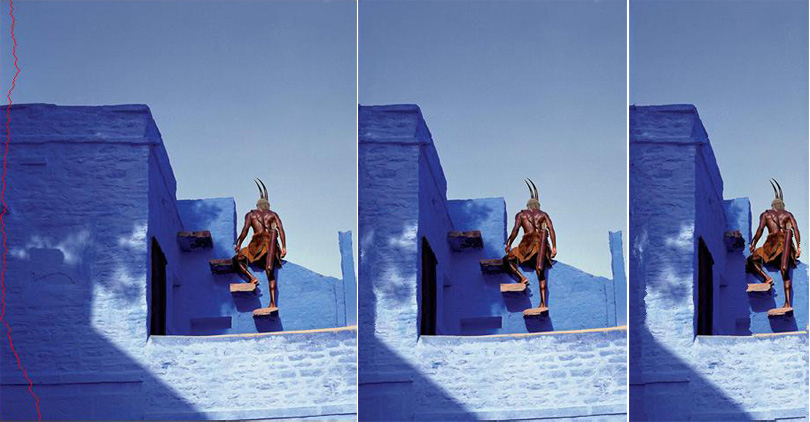
Recently just finished writing a neat seam carving algorithm for Computational Photography. Essentially its a neat image resizing algorithm that finds the least important "seams" in an image (for example, the red line in the image above) and deletes them, preserving the overall composition/important bits where it can.

9.20.2011
In which Alex attempts to learn OpenGL | Animated Water Mesh
Here's a quick animation I rendered in OpenGl, it was actually the first time I created something using the "raw" language, versus using a beautiful shell, like Processing or Cinder to do all the horrible matrix like stuff for me. It was incredibly frustrating, since I would spend hours implementing something that I knew how to do in a single line using one of the interfaces (grrr!)
Not a pointless exercise though, since I understand the underlying processes of the language SO MUCH BETTER now, and it'll make it significantly easier to work with it in the future. The basin is a static mesh I imported and rendered, whereas the water is dynamically generated, (and I recalculate the normals/mesh data every frame). I'll post a video as soon as I can convince my poor hp to do so without shutting off in agony :)


Not a pointless exercise though, since I understand the underlying processes of the language SO MUCH BETTER now, and it'll make it significantly easier to work with it in the future. The basin is a static mesh I imported and rendered, whereas the water is dynamically generated, (and I recalculate the normals/mesh data every frame). I'll post a video as soon as I can convince my poor hp to do so without shutting off in agony :)


From Russia with Love | Colorizing the Sergei Mikhailovichn Prokudin-Gorskii Collection
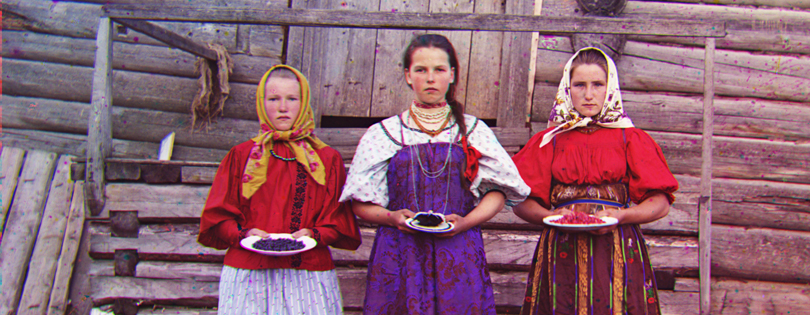
A quick Computational Photography project, I took Gorskii's original BW negatives from the Library of Congress and wrote an algorithm to colorize them so they could be seen as intended. (check out the rest of the images after the break, or go for the long haul at the computational photography blog)
9.08.2011
Designing for the iPad | InDesign to ePub
When I was working for Annenberg this summer, one of the projects I always had on the back burner was their effort to go green. This typically included turning off the light, surreptitiously hiding the 50 printed copies of 11x17 floorplans that got changed at the last minute at the bottom of the paper recycle, and diligently placing the separate components of my 4 daily super fancy Californian lattes in the appropriate bins.
But being the true CS major I am, and looking around the barely tamed chaos of my small assistant desk; littered with brochures, pamphlets, and general swag (my boss Charles' off work wardrobe is almost solely comprised of free USC stuff), I couldn't help but think why do we have some much paper??
Since we also hand out iPads like candy, I figured we should also have the Emergency Procedure brochure I designed could be sent out as an epub. Not only is it paperless distribution, but it would rack up the count of relevant things the general public actually uses the iPads for to 2.
The problem is, I wanted to retain my beautiful layout/images from the original brochure when porting it over.
(Here's some of the spreads from the original document, intended for print)
But being the true CS major I am, and looking around the barely tamed chaos of my small assistant desk; littered with brochures, pamphlets, and general swag (my boss Charles' off work wardrobe is almost solely comprised of free USC stuff), I couldn't help but think why do we have some much paper??
Since we also hand out iPads like candy, I figured we should also have the Emergency Procedure brochure I designed could be sent out as an epub. Not only is it paperless distribution, but it would rack up the count of relevant things the general public actually uses the iPads for to 2.
The problem is, I wanted to retain my beautiful layout/images from the original brochure when porting it over.
(Here's some of the spreads from the original document, intended for print)


9.06.2011
Laser Cut Rings | Takemoto + Wolfe
We just got a brand new shiny laser cutter, so Cara, Ethan, Kiera and I created some simple things to put it through its paces. We threw the files together in Illustrator and tested all of the acrylic colors that Scott ordered


Kiera and I made some WOLFE silhouette rings, knuckle dusters, dangerous looking pendants, and bismuth pendants/rings (from the most awesome Gunnerkrigg Court). Kiera took photos of the yellow versions for clarity

Cara and Ethan (well mostly Cara) did Takemoto rings in Kanji, Hirigana, and Helvetica


Kiera and I made some WOLFE silhouette rings, knuckle dusters, dangerous looking pendants, and bismuth pendants/rings (from the most awesome Gunnerkrigg Court). Kiera took photos of the yellow versions for clarity

Cara and Ethan (well mostly Cara) did Takemoto rings in Kanji, Hirigana, and Helvetica

4.29.2011
Reaction-Diffusion Knit


So I finally finished the Reaction-Diffusion swatch! Doing it by hand instead of on a computer controlled machine took forever (for something that was rather small), but it allowed me to incorporate certain textural stitches such as cables that would have been impossible otherwise. I really like the final product, and actually wherever there were 3x3 cables in the pattern produced the best results, but those are really difficult to produce on the machine (you have to knit those rows manually since the stitches are too tightly pulled). The 1x1 cables of which there was an abundance of in that middle section are much more subtle.
I definitely want to knit another swatch at a large gauge for hopefully more obvious results and produce either a simple sweater or dress during my off days for final.
Also my terrible digital camera, was well, being absolutely terrible so I'll repost with better pictures of the final later.


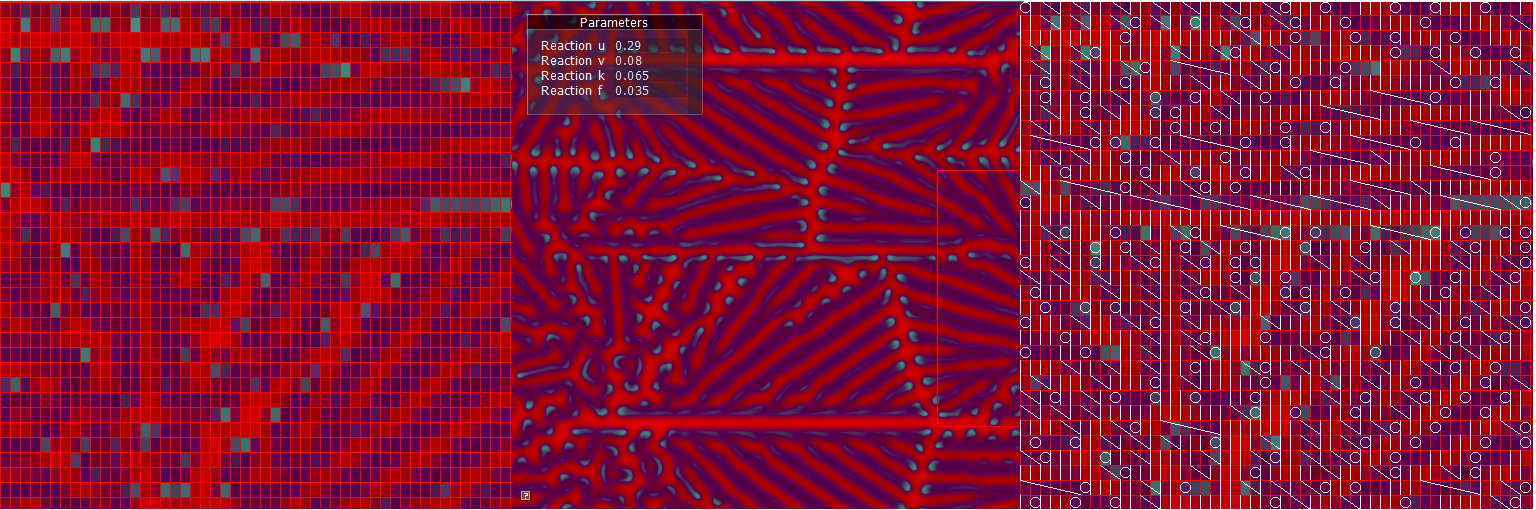
The swatch was knit from this digital reaction diffusion swatch
Subscribe to:
Comments (Atom)